By Glyf
Validation Rules (Totals & Taxes)
Net plus tax should roughly equal gross. That's the whole rule behind how Glyf treats totals and tax fields once they're extracted: a subtotal, one or more tax lines, and a final total that ought to reconcile with each other in a way you could check by hand if you had the patience. Most invoices behave. Some don't: rounding differences, partial itemization, or a tax line that doesn't quite add up the way the rest of the document suggests it should.
That gap between "the numbers are present" and "the numbers make sense together" is what validate invoice totals and tax is actually about. Extracting a total is one job. Giving you a reason to trust it (or a reason to double-check it) is a different one.
How Glyf validates invoice totals and tax before export
Glyf's Data Extraction Engine extracts total cost, currency, and tax details as separate structured fields rather than one flattened number, which is what makes subtotal tax total validation possible in the first place. Once a subtotal, a tax amount, and a final total are all present, they should roughly reconcile: that's the plain-language version of the check, and it's a rule anyone doing manual bookkeeping already applies without thinking about it. Where Glyf's structured extraction helps is in making that check fast: subtotal, tax, and total sit as separate, editable fields in the Invoice Drawer instead of buried inside a single total line you'd have to unpack by hand. If a document is missing its Total Cost or Currency field entirely, it gets flagged as Needs Attention automatically, which surfaces the gap before the record ever reaches an export.
Why the tax rate field returns null instead of a guess
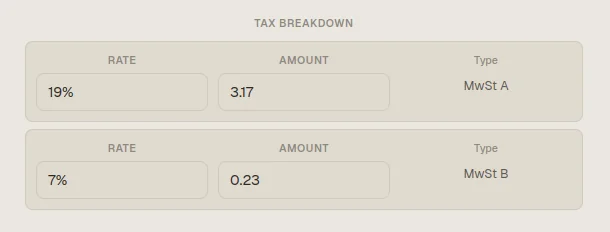
Tax fields fail quietly, not loudly. A document can look complete (a total, a tax line, a reasonable-looking figure) while the tax rate itself was never actually legible on the source. Glyf's Primary Tax Rate field returns null when the rate can't be read with confidence, rather than filling in a plausible-looking number that might be wrong. That's a deliberate tradeoff: an honest blank is easier to spot and fix than a confident-looking figure that happens to be off by a percentage point. A null tax rate next to a filled-in tax amount is a specific, visible signal that something on that document needs a second look, rather than a discrepancy buried inside a total that otherwise looks fine. The kind of tax sanity check that a single flattened total field could never surface.
When are rounding differences normal, and when aren't they?
A one-cent gap between a calculated tax figure and the printed total isn't unusual: plenty of vendors round each line before summing, or round the final total independently of the line-level math, and the result is a document that's internally correct but doesn't reconcile to the last decimal. That's normal enough that it shouldn't derail a review. What's worth a second look is a gap that's larger than simple rounding would explain, or a tax amount that doesn't correspond to any rate that makes sense against the subtotal. Glyf doesn't silently smooth over either case. The point of running rounding checks at all isn't to flag every cent: it's to leave the extracted values as read, editable individually, so a real discrepancy stays visible in the drawer instead of getting quietly reconciled away before you ever see it.
What gets flagged before export, and what still needs your eyes
Needs Attention catches missing critical fields: a blank Total Cost, a blank Currency, a document with no line items at all. It doesn't catch every case where numbers technically exist but don't sit well together, and it isn't meant to. Financial documents still deserve a review pass before export, especially when totals, tax lines, or vendor details feed directly into bookkeeping, reporting, or tax prep. That's why every field in the Invoice Drawer stays editable regardless of whether the document carries a flag: a subtotal that looks slightly off is worth checking even on a record that extracted cleanly. The flag narrows where your attention is required. It was never meant to replace the moment where you actually look at the numbers.
Line items add more math to check, not less
Validation gets more useful, not less, once a document includes line items. When descriptions, quantities, unit prices, and line totals are all present, they give you extra context for judging whether the header-level totals feel coherent: a subtotal that doesn't roughly match the sum of its line totals is a much clearer signal than a total that simply looks a little high. That doesn't mean every invoice arrives fully itemized or perfectly structured; plenty don't. But where line item data exists, it strengthens the review path around totals and taxes rather than adding a separate, disconnected check. For the fuller picture of how line items and tax breakdowns get extracted, see Line Items & Tax Extraction.
Part of the wider Data Extraction Engine workflow
Validation for totals and taxes is one layer inside Glyf's broader document workflow, not a standalone add-on. Files get checked before upload, structured financial fields get extracted, users review results inline, and exports happen only after that review stage. This page covers the financial consistency layer inside that process specifically. For the broader feature context, go back to Data Extraction Engine. For more on review and quality controls generally, continue to the guides hub or the accuracy hub.
FAQ
Does Glyf automatically correct a total that doesn't reconcile? No. Extracted values are returned as read, not silently adjusted to fit a formula. If a total, subtotal, or tax figure looks off, it stays visible and editable in the Invoice Drawer for you to confirm or correct.
What triggers a Needs Attention flag related to totals or tax? A missing Total Cost or missing Currency field triggers the flag directly. A tax rate that returns null because it couldn't be read confidently doesn't trigger Needs Attention on its own, but it's worth checking alongside the tax amount.
Is a small rounding gap between tax and total a sign of a bad extraction? Not usually. Vendors round line items and totals differently, and a one or two-cent gap is common on documents that are otherwise correct. Larger gaps or figures that don't correspond to any sensible tax rate are the ones worth a closer look.