By Glyf
Field Detection & Normalization
Three receipts, one vendor. The first reads "ACME LTD." The second, scanned from a different supplier portal, reads "Acme Limited." The third, a photo of a paper receipt from the same company's warehouse counter, reads "Acme GmbH." Search your history for "Acme" later and depending on how the field was captured, you might see one entry, two, or three. The same business, scattered across your records like it's three different companies.
That's the exact problem vendor normalization for receipts is built to solve. Glyf's Data Extraction Engine pulls the raw value off each document, then returns it in a cleaner, more consistent format where possible, before it ever reaches your history table.
Vendor normalization for receipts: the ACME LTD problem
Normalization doesn't erase the differences between how three documents were printed. It reconciles them into a value you can actually search and filter on. When the engine detects "ACME LTD," "Acme Limited," and "Acme GmbH" as variants of the same merchant, it returns them in a more consistent form rather than three unrelated strings passed straight through with their typos, capitalization, and legal suffixes intact. The practical difference shows up the first time you type "acme" into search and get one clean set of results instead of three fragments to stitch back together. It's not a cosmetic fix: it's the difference between a usable vendor history and a spreadsheet full of near-duplicates that all mean the same thing.
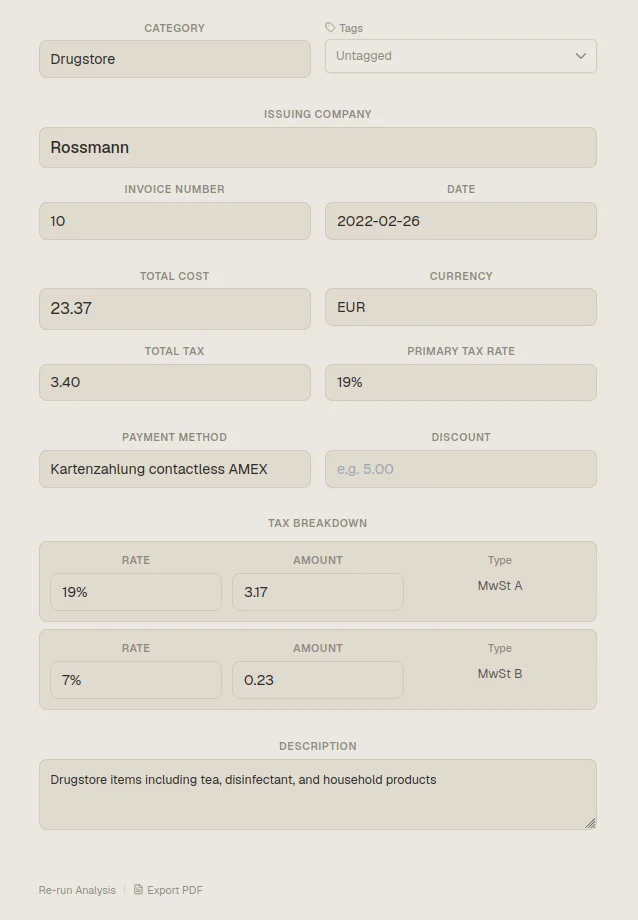
How do we normalize merchant names without losing what the document actually says?
Merchant fields are the messiest part of most receipts and invoices, and for good reason: every business prints its own name differently depending on the document type, the printer, or the point-of-sale system that generated it. A clean digital invoice might carry the full legal entity name. A receipt photo from a counter might show a shortened, abbreviated version. A forwarded PDF might carry something else entirely. Glyf detects the merchant field first, then normalizes it so the extracted value is easier to read, search, and file consistently, without discarding the original document image, which stays viewable in the Invoice Drawer alongside the cleaned-up field. That matters because vendor-based organization falls apart quickly once the same business starts appearing under five slightly different names across your history.
Dates: from three formats to one you can scan at a glance
Date formats are a quieter source of friction, but they add up fast across a mixed batch. Some documents use day-month-year. Others use month-day-year. Separators vary: slashes, dots, dashes, or none at all. None of that is wrong on the source document; it's just inconsistent once fifty documents from different vendors and regions land in the same history table. Glyf helps standardize dates so the extracted value reads consistently regardless of how the original was printed. That removes the small moment of hesitation where you have to decode which number is the day and which is the month before trusting what you're looking at. A minor thing on one document, a real drag across a full month of receipts.
Currencies: one consistent code instead of five symbols
Glyf helps standardize currencies too: currency is extracted as its own structured field, then returned as a standard ISO code (EUR, USD, GBP, and so on) rather than whatever symbol or label happened to appear on the source document. Some invoices show a currency symbol, some spell out a full label, some print a code already. Glyf reads all three and returns a consistent value, which matters most once you're filtering history down to a single currency for an expense report or isolating mixed-currency records before an export. It's a small piece of the extraction, but it's the piece that keeps a multi-currency history usable instead of a filtering headache.
What normalization doesn't do
Normalization improves consistency. It doesn't guarantee every variant gets caught, and it doesn't replace review. Unusual abbreviations, heavily damaged documents, or a merchant name that's genuinely ambiguous on the source can still come back exactly as printed, uncleaned. That's why every field (normalized or not) stays editable in the Invoice Drawer, and why a document missing a critical field like Issuing Company still gets flagged as Needs Attention rather than silently passed through. Cleaner output reduces the review burden. It was never meant to remove it entirely.
Where the payoff actually shows up
The real value of normalization isn't visible on a single document. It shows up once you're working across dozens of them. Search gets more reliable because the same vendor doesn't fragment into multiple entries. Filters return complete results instead of partial ones. Exports need less manual cleanup before they're presentable to a client or an accountant. Tagging gets easier because you're not tagging "Acme" three separate times under three spellings. None of that matters much on day one with five documents in your history. It matters by month three, once your archive has grown past the point where you can reconcile the duplicates yourself.
Part of the wider Data Extraction Engine
Field detection and normalization sit underneath the larger extraction workflow, not beside it. Files get validated before upload, structured fields get extracted from receipts and invoices, normalized values come back where possible, and everything lands in a table you can review, edit, and export. This page covers one link in that chain: the step that turns a raw extracted value into something consistent enough to search and file with confidence. For the broader engine overview, go back to Data Extraction Engine. For the full list of fields this feeds into, see What Glyf Extracts. And for broader document organization, see the features hub.
FAQ
Does normalization change what's shown in the original document image? No. The source image in the Invoice Drawer stays exactly as uploaded. Only the extracted field values are returned in a more consistent format. The original document is always there for comparison.
Will normalization always merge every variant of a vendor name? Not always. It handles common variation patterns, but an unusual abbreviation or a genuinely ambiguous name on a damaged document can still come through as printed. That's part of why every field stays editable after extraction.
Does currency normalization convert between currencies? No. Glyf returns the currency as a standard code rather than converting the amount: a EUR invoice stays in EUR. Conversion isn't part of the extraction step.