By Glyf
What Glyf Extracts
Glyf is a receipt and invoice data extractor built for one job: turning messy documents into clean, structured data you can actually use.
It extracts the fields you need for expense processing, then lets you export the results to Excel/CSV.
Looking for receipt-specific or invoice-specific pages? Receipts: Intelligent extraction for receipts Invoices: Intelligent extraction for invoices
Core Fields (Most Documents)
These are the "always useful" fields you'll see on the majority of receipts and invoices.
- Vendor / merchant name (extract vendor names)
- Document date
- Document number (common for invoices)
- Currency
- Subtotal
- Tax / VAT amount
- Tax rate (when shown)
- Total amount (extract totals tax dates)
If your document includes these, Glyf will aim to capture them and place them into consistent columns.
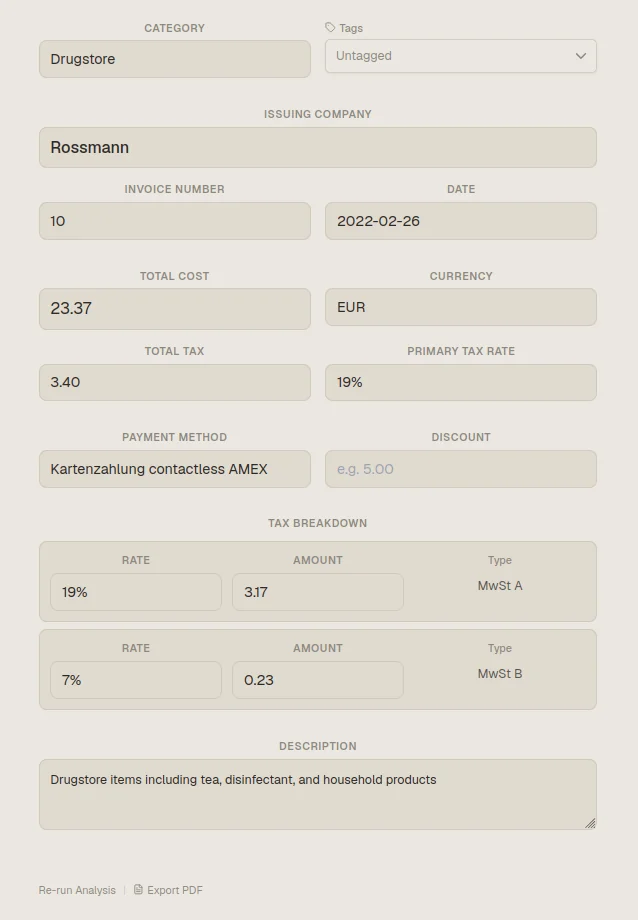
Tax & VAT Details (When Present)
Tax is where exports usually fall apart — different formats, different countries, different naming.
When available on the document, Glyf can extract:
- VAT / tax amount
- VAT / tax rate
- Tax breakdowns (e.g., multiple rates on the same invoice)
- Tax labels (VAT, MwSt, IVA, etc.)
Deep dive feature page:
Line Items (When You Need Them)
Some users only need totals. Others need the details.
When line items are present and clearly structured, Glyf can extract:
- Item/service description
- Quantity
- Unit price
- Line total
- Line-level tax info (when shown)

This is especially useful for:
- category-based cost tracking
- detailed expense reporting
- validating invoice totals quickly
Feature page:
Supplier / Customer Fields (Invoices)
Invoices often include identity data that matters for bookkeeping.
When present, Glyf may extract:
- Supplier name
- Supplier address (as a structured block when possible)
- VAT ID / tax number
- Customer / bill-to name (if included)
- Payment terms (e.g., "Net 14" when clearly shown)
- IBAN / bank details (when present)
Note: invoices vary wildly by template. The more standard the layout, the cleaner the extraction.
Payment & Reference Fields (Mostly Receipts)
Receipts sometimes include data that's useful for reconciliation.
When present, Glyf may extract:
- Payment method (card / cash, when stated)
- Last 4 digits (when printed)
- Transaction/reference number
- Store location (when included)
What You'll See in Exports
Glyf's goal is consistent columns so you can work in spreadsheets without cleanup.
Exports include:
- Excel (.xlsx)
- CSV
- PDF reports (when needed for audit trails)
Feature page: