By Glyf
Smart Expense Extractor
If you're comparing expense extractors, accuracy is only half the question. The other half is what happens to your documents once they're uploaded: where they're stored, who can see them, and whether the fields you actually need are the ones the tool bothers to pull out.
Glyf is a smart expense extractor built around three things buyers tend to check last and regret not checking first: field coverage, data residency, and a plain answer to "do you train on my documents." Upload → Extract → Export is the visible workflow. The rest of this page is what's underneath it.
What field coverage should you expect from an expense extractor?
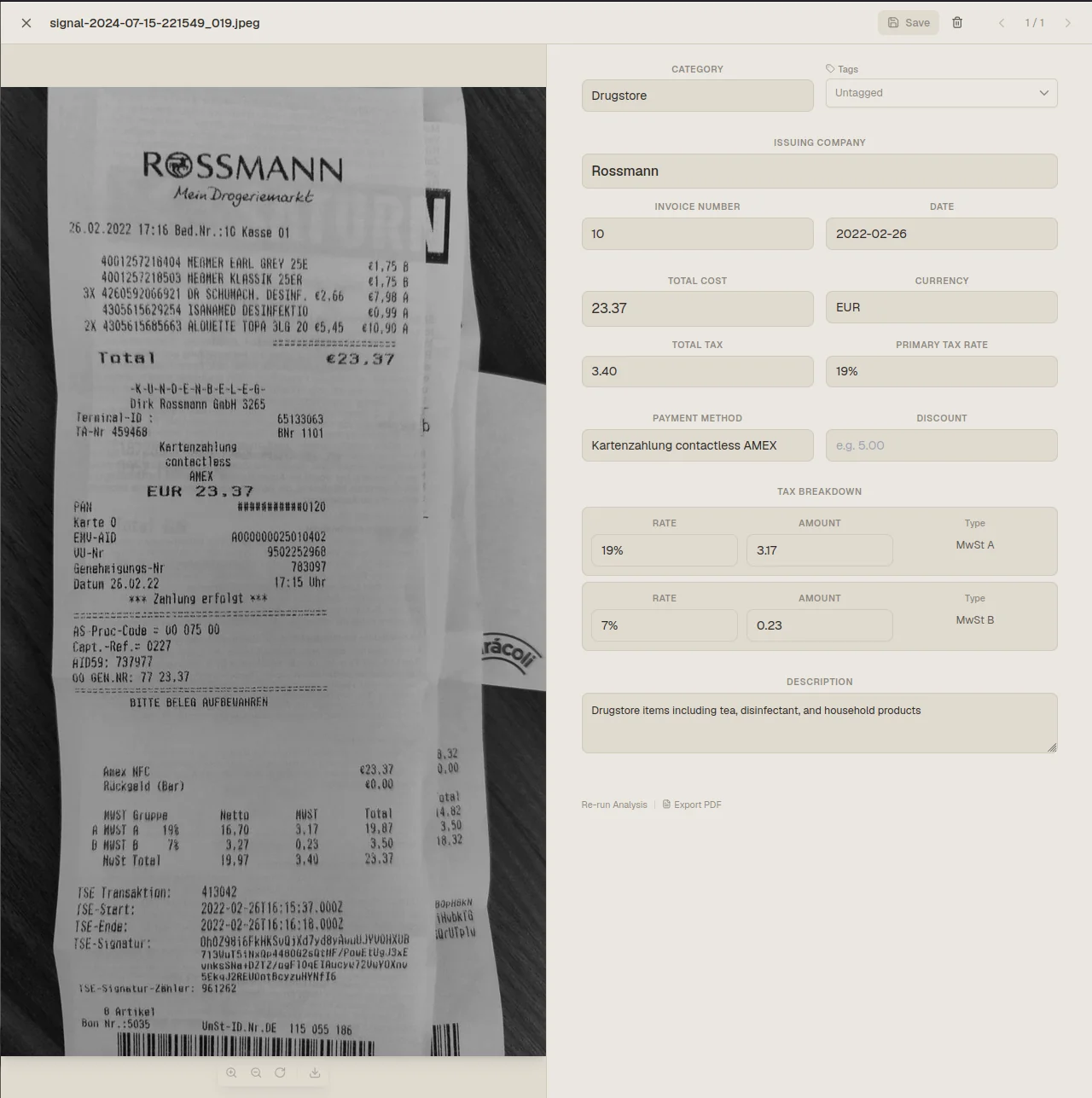
A useful extractor returns the fields your bookkeeping actually runs on, not just a vendor name and a total. Glyf pulls vendor, date, total, currency, tax amounts where they're shown, invoice numbers on invoices, and line items when a document has them and they're legible. That's a deliberate scope. Receipts and invoices vary wildly in layout, and a tool that promises to extract everything from every document is overselling. Where the data exists and is readable, Glyf returns it in the same set of columns every time, which is what actually saves time later: no reformatting, no guessing which column means what across three different exports. Where a field is genuinely missing from the source document, it stays blank rather than getting invented, and you can fill it in during review.
Why does EU hosting matter for an expense tool?
Because receipts and invoices carry more than totals: vendor relationships, purchase history, sometimes tax IDs and addresses. Glyf's primary infrastructure and databases are hosted in the EU, which is a meaningfully different claim from "we're GDPR-friendly" without specifics. For buyers with a data-residency requirement, that's often the first filter before anything else on this page even gets read. It's also why this matters more here than in a generic productivity tool: expense data tends to outlive the reason you uploaded it, sitting in an archive for months or years for tax and audit purposes. Full details, including what happens when a service provider processes data outside the EU, live on EU hosting & GDPR.
The review loop, not just the extraction
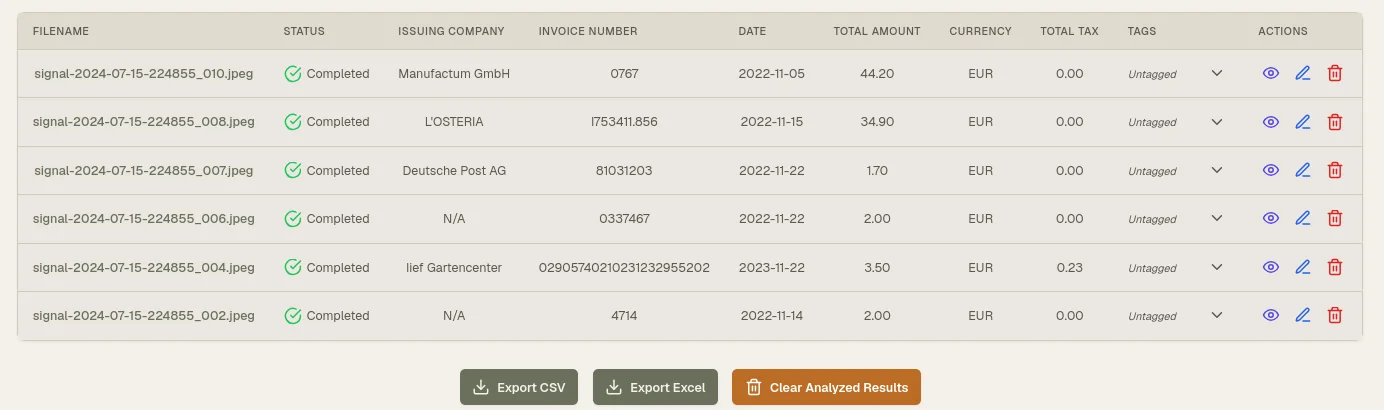
Real documents are messy, and Glyf doesn't pretend otherwise. After extraction, results land in a table you can scan at a glance, and any document where a critical field couldn't be confidently read gets flagged Needs Attention so it surfaces instead of getting buried. Open a document in the Invoice Drawer and every field is directly editable: click, correct, done. That loop is what makes roughly 95% extraction accuracy usable in practice: the remaining documents aren't a mystery, they're a short, specific list you can clear in one pass before anything gets exported.
Getting the data out: exports that don't need cleanup
Extraction only pays off if the output goes somewhere useful. Glyf exports to Excel and CSV, so expense data doesn't stay trapped in a dashboard you have to log into every time you need a number. Excel includes a Summary sheet (one row per document) and a Line Items sheet (one row per line item). That split matters because a flattened single-sheet export forces you to reconcile totals against line detail by hand. CSV is a flat, one-row-per-line-item format built for accounting software imports. Both formats carry your applied tags, so a categorized export stays categorized. See the column layout at Excel/CSV export.
Who uses a smart expense extractor like this
Glyf gets used by people who handle expenses in volume or under deadline pressure: freelance bookkeepers running several client accounts at once, small business owners clearing out a shoebox of receipts before a filing deadline, accountants who'd rather review than retype, and operations teams trying to keep expense reporting consistent across a team. None of these groups need a finance platform with a learning curve. They need the extraction done correctly and the data out fast. If manual entry happens more than once a month for you, the time saved compounds quickly, since every batch skips the typing step entirely and goes straight to review. For the broader workflow view beyond extraction alone, start with Expense processing.
Data Extraction Engine: what it actually does
Glyf's Data Extraction Engine is the layer that reads uploaded documents and returns the structured output described above. It isn't a black box you have to trust blindly, since every result runs through the review step before export. The engine is built specifically for receipts and invoices rather than generic documents, which is part of why it can return consistent fields across a fuel receipt, a restaurant bill, and a multi-page supplier invoice without three different workflows. For a closer look at how extraction handles document variety, read Data Extraction Engine.
Quick answers
Does Glyf work with receipt photos, not just PDFs? Yes. PDF, JPG, PNG, and WEBP are all supported, including phone photos of paper receipts, up to 10MB per file.
Is there a free way to test extraction quality? Yes. The Free Trial includes 15 total analyses with no credit card required, enough to run a real batch of your own documents through the workflow before deciding anything.
Try it on your own documents
The fastest way to judge a smart expense extractor is with your own receipts and invoices, not a demo. See the full stage-by-stage flow at How it works, then run a real batch through the free trial. 15 analyses, no card required.