By Glyf
Audit-Ready Organization
If you’re trying to organize receipts and invoices for accounting, you don’t need “more folders.”
You need a system that answers the annoying questions fast:
- “Where’s that supplier invoice from April?”
- “Show me all receipts tagged Office Supplies.”
- “Export everything for the auditor. Clean. Complete. Done.”
Because the real pain isn’t scanning. It’s the hunt.
And audits don’t wait for your memory to kick in.
Why “organized” breaks under pressure
Most setups look fine… until they don’t.
A typical mess starts innocently:
- PDFs named
invoice_final_FINAL2.pdf - Receipt photos scattered across phones
- A half-finished spreadsheet that only one person understands
- “We’ll sort it later” (famous last words)
Then someone asks for proof.
Now you’re searching email threads, WhatsApp screenshots, and random cloud folders like you’re doing digital archaeology.
Audit-ready doesn’t mean “perfect.”
It means: findable, consistent, exportable.
Audit-ready receipts means three things
1) Everything lives in one place
Not five places. Not “mostly in Drive.”
A proper archive means your receipts and invoices are stored together as a history you can return to, not a one-time upload that disappears after export.
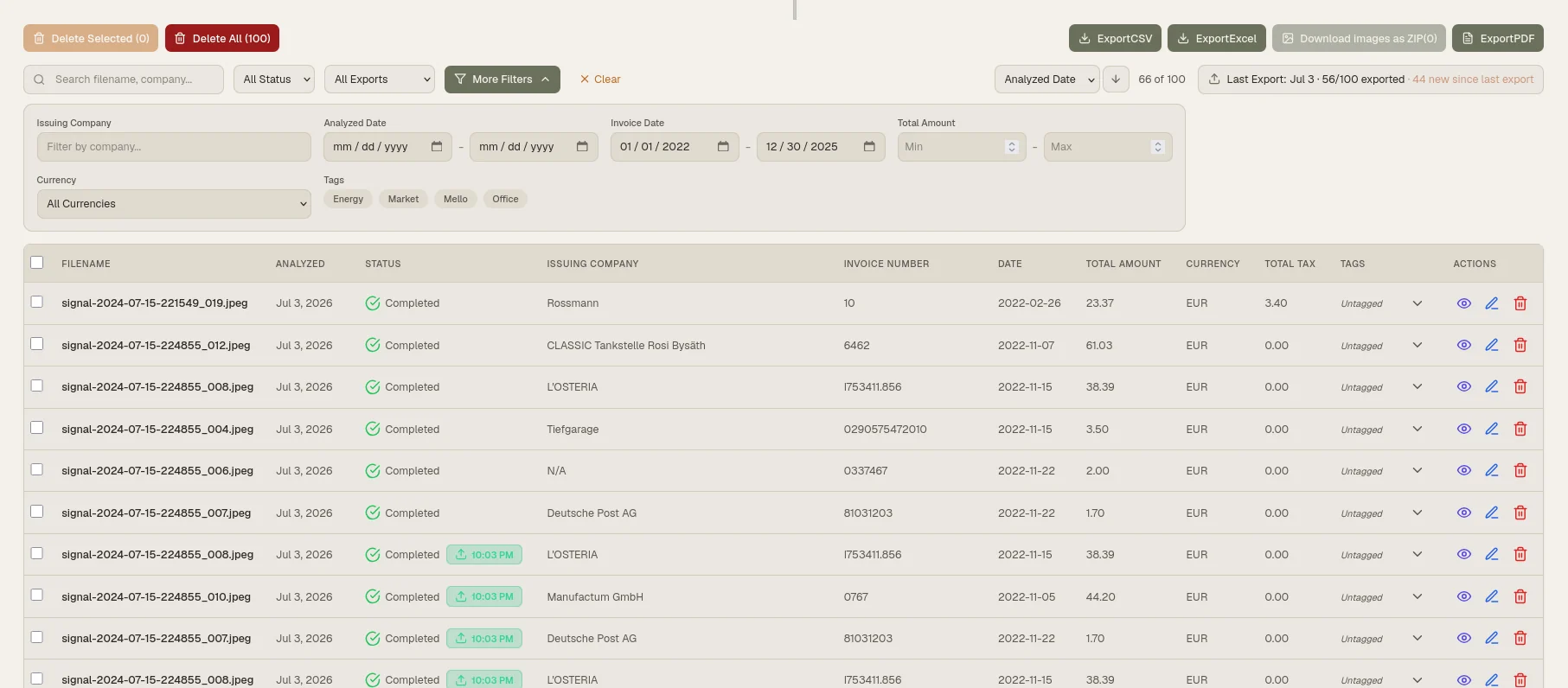
2) You can search and filter like a grown-up system
You should be able to find a document by vendor, amount, date range, currency, and keywords.
That’s what turns a pile of files into a searchable receipt archive.
3) You can hand over evidence without rebuilding it
Auditors and accountants want structured data. They also want traceability.
So the final step matters: export for audit in a format that matches how your accountant works (Excel or CSV), while keeping documents easy to reference.
The workflow that actually holds up
Here’s a simple, repeatable pattern that doesn’t collapse at month-end.
Step 1: Collect receipts and invoices as they happen
Don’t treat organization like a once-a-year event.
Upload digital invoices, PDFs, and receipt photos as you receive them. This is the moment where the system saves you later.
If you’re running ongoing expense handling, pair this page with your broader expense flow:
Step 2: Extract the fields you’ll be asked for
Audit requests usually revolve around the same core details:
- Vendor / merchant
- Invoice number (where applicable)
- Date
- Total and currency
- Tax amount(s)
- Line items (when needed)
Glyf’s Data Extraction Engine pulls these into structured fields so you’re not manually typing them into a spreadsheet at the worst possible time.
And yes — review still matters. But reviewing a few fields is not the same thing as re-entering everything.
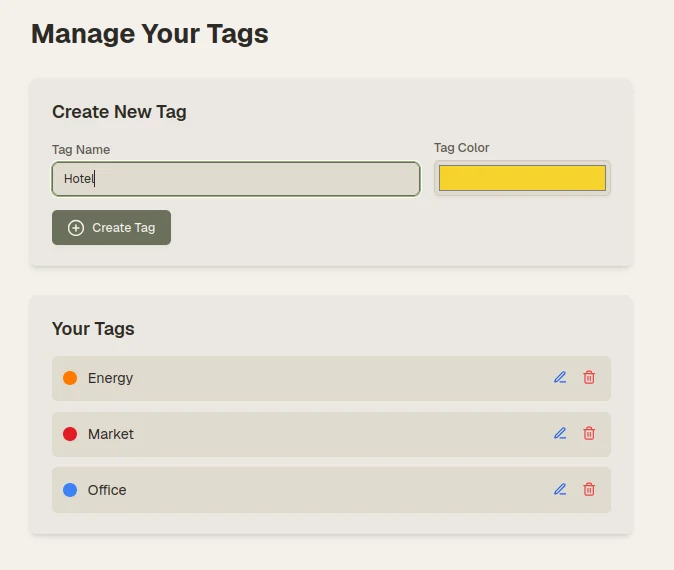
Step 3: Tag the documents like you’ll thank yourself later
Tags are how you turn a history list into a system.
Examples that keep accountants happy:
Office SuppliesShippingSoftwareTravelInventoryClient Reimbursable
Keep it boring. Boring is good. Boring is fast.
If you want the deeper feature breakdown, head to:
Step 4: Build a retrieval habit (so you don’t panic later)
Here’s a small rule that changes everything:
Once a week (or once a month), do a 2-minute sanity check:
- filter last 7/30 days
- spot-check a few totals and dates
- make sure “weird” receipts are tagged
That’s it.
Now when someone asks, “Can we see all invoices for X?” you don’t flinch.
Step 5: Export in the format your accountant expects
The moment you export is where systems usually fall apart.
You don’t want:
- a messy CSV with random columns
- inconsistent vendor names
- missing dates
- totals that require manual cleanup
You want spreadsheet-ready output that drops into your accounting workflow.
Glyf supports structured export formats designed for real bookkeeping habits. For anything export-related:
Common audit requests you can answer quickly
An auditor (or tax office) might ask for:
- “All receipts for a specific quarter”
- “Invoices from supplier X, including tax details”
- “Proof for a specific expense category”
- “A list of expenses over a certain amount”
- “Supporting documents for an entry in the ledger”
With a searchable archive + tags + structured exports, those become filters and downloads. Not a three-day scavenger hunt.
If you’re building an internal workflow for handling these requests, start here:
Data retention and deletion matters (even if nobody talks about it)
Audit readiness isn’t just about finding things. It’s about knowing what you keep, for how long, and what happens when you delete it.
That’s part of being organized in a way that stands up to scrutiny — especially in the EU.
For privacy, retention, and how your data is handled:
Who this is for
This workflow hits hardest for:
- Freelancers who handle their own taxes
- Bookkeepers juggling multiple clients
- Small businesses with supplier invoices + daily receipts
- Ops teams dealing with distributed spending (multiple people, multiple sources)
If your current system is “we’ll sort it later,” you’re one audit request away from learning new forms of stress.
A quick reality check
A folder structure is not an organization system.
An audit-ready system is:
- a single place where receipts and invoices live
- searchable and filterable history
- tags for categories and workflows
- exports that don’t need cleanup
- clear handling of retention/deletion
That’s what turns tax season into a normal week.
And if you want the fast path to set this up end-to-end, start with: