By Glyf
Data Extraction Engine
Most documents are easy for humans to read and annoying for software to understand.
A receipt has totals, tax lines, merchant details, dates, and line items. An invoice has its own structure, its own formatting, and its own little ways of being inconsistent. Some come as clean PDFs. Others arrive as scans, screenshots, or phone photos taken under bad lighting. And yet the goal is always the same: turn all of that into data you can actually use.
That is what Glyf’s data extraction engine for receipts and invoices is built to do.
It reads receipts and invoices, pulls out structured fields, and gives you data that is ready to review, correct, search, and export. Not raw OCR text. Not a wall of guesswork. Structured output that fits real bookkeeping and expense workflows.
What the Data Extraction Engine actually does
At a basic level, the engine turns business documents into structured records.
But that undersells it a bit.
The real job is to handle intelligent document data extraction across documents that are messy, varied, and often inconsistent. A supplier invoice does not look like a fuel receipt. A restaurant bill does not look like a utility invoice. A digital PDF behaves differently from a photo of paper.
The engine is built to work across those differences and still return the fields that matter.
That includes:
- invoice number
- invoice date
- issuing company
- category
- short description
- total cost
- currency
- tax details
- line items
- payment method
- discount amount
The result is data you can actually work with instead of documents you still need to decode manually.
More than OCR: automatic data capture from documents
A lot of tools stop at text recognition.
That sounds helpful until you try using the output. You get text, yes. But not always the right structure. Not always the right field mapping. And not always something you can drop into a spreadsheet or accounting workflow without more cleanup.
Glyf focuses on automatic data capture from documents, not just reading text off the page.
That means the engine is trying to identify what each value is, where it belongs, and how it should be returned in a consistent format. A total should come back as a total. Tax details should come back as tax details. Line items should stay line items, not dissolve into a blob of half-useful text.
That difference matters. A lot.
Built for receipts and invoices, not generic files
General-purpose document readers often struggle because they are too broad.
Glyf’s Data Extraction Engine is focused on receipts and invoices. That narrower focus helps it deal with the details that matter in expense processing, bookkeeping, and tax prep. Things like totals, tax breakdowns, vendor information, currency, and itemized purchases are not side notes here. They are the point.
That is also why the engine works across the formats people actually use:
- PDFs
- JPGs
- PNGs
- WEBP files
- phone photos of paper receipts
So whether you are dealing with digital supplier invoices or a pile of photographed receipts, the workflow stays the same.
Extract fields from PDFs, scans, and receipt photos
A good extraction engine should not fall apart the moment the document stops being perfect.
Glyf can extract fields from PDFs, but it is not limited to clean digital files. It is also built to work with scanned images and receipt photos, which is where a lot of real-world expense data still lives.
That matters for businesses that collect expenses from multiple places. Some documents come from email attachments. Some are downloaded from portals. Some are snapped on a phone while standing at a counter. The engine is meant to handle that mix without forcing you into a completely different process for each type.
You upload the documents you already have. Glyf validates type, size, and duplicates before processing starts. Then the engine extracts the structured fields and returns them for review.
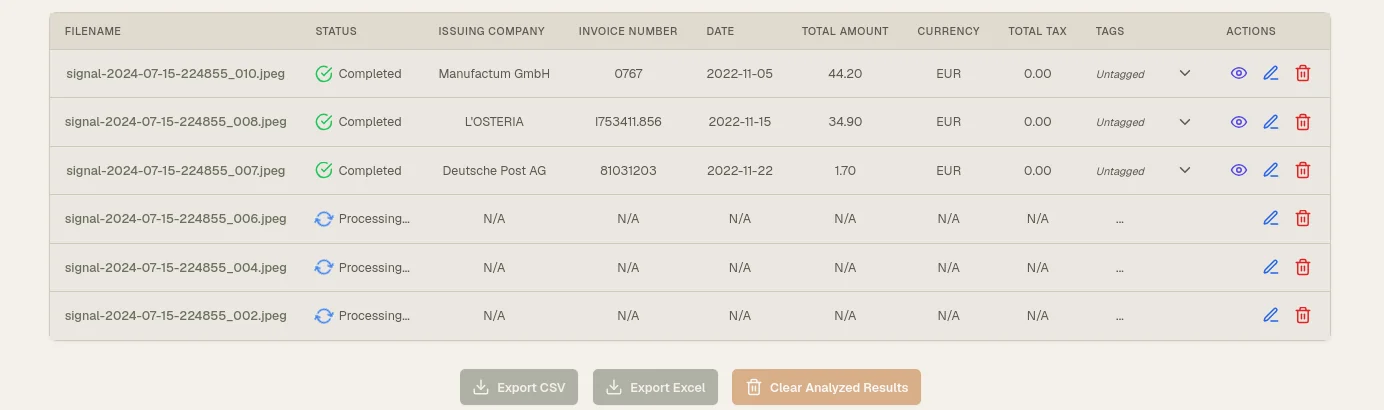
Simple workflow. Less mess.
What happens after extraction
Extraction is only useful if the next step is usable.
After processing, each document appears in the results table with core details such as status, issuing company, invoice date, and total amount. Open any record and you can inspect the original document side by side with the extracted fields.
Every field is editable.
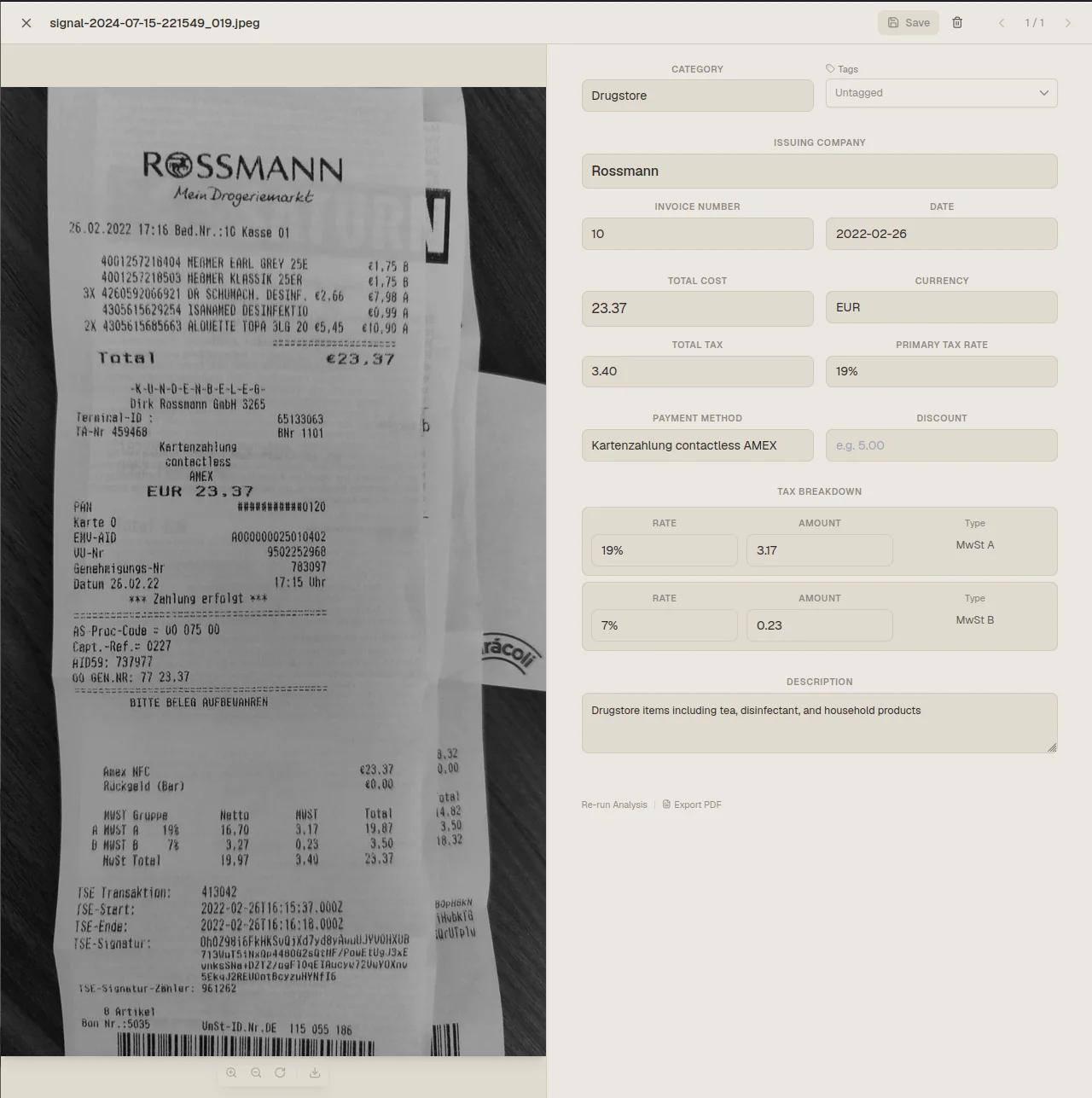
That part matters because no serious expense workflow should pretend automation removes the need for review. The goal is not blind trust. The goal is speed with control.
If a critical field could not be confidently extracted, the document is flagged as needing attention. That gives you a clear review queue instead of letting incomplete records quietly slip into export.
Why structure matters more than speed alone
Speed is useful. But speed without structure just moves the mess downstream faster.
The real value of a Data Extraction Engine shows up when the output is already organized in a way that fits reporting, bookkeeping, reconciliation, and tax prep. That is why Glyf is built around structured results, editable review, and export-ready output.
Instead of spending hours typing values into spreadsheets, you start with a record that already contains the fields you care about. Instead of reading line by line through a PDF, you review and correct only what needs attention.
That is the difference between automation that looks good in a demo and automation that actually saves time.
Where the engine is most useful
Glyf’s engine is especially useful when you are dealing with:
- repeated receipt and invoice entry
- mixed file types from different vendors or clients
- document backlogs before month-end or tax season
- manual spreadsheet preparation
- workflows that need line items and tax details, not just totals
It is built for people who need documents to become usable data quickly. Bookkeepers. Small business owners. Operations teams. Accountants. Anyone stuck doing repetitive document cleanup by hand.
Connected workflows built on the same engine
The Data Extraction Engine is the core layer behind several Glyf workflows.
If you want to see how that applies to specific document types, start here:
If you care about deeper field coverage, especially itemized data, continue with:
And if you want to understand how Glyf handles review, validation, and output quality, see:
The point of the engine
The point is not to sound clever.
The point is to help you stop treating receipts and invoices like tiny manual data-entry projects.
Glyf’s Data Extraction Engine turns those documents into structured, reviewable, export-ready data. Faster than doing it by hand. Cleaner than generic OCR output. And practical enough to use in real workflows, not just product demos.